Bookmark and Share

Facebook Emoticons

Monday, April 5, 2010
 Facebook Emoticons Smileys

Facebook is the most popular social network out there. It first started as a network for Harvard students but soon expanded to accept everybody all over the world and gained enormous popularity among all generations. It is almost hard to find in these days someone who is not “on Facebook”.

Here is the list of all Facebook Emoticons and their shortcuts:


                     Emoticon                  Name                    Shortcut

smile smile :-) :) :] =)
tongue tongue :-P :P :-p :p =P
wink wink ;-) ;)
grin grin :-D :D =D
curly lips curly lips :3
kiss kiss :-* :*
grumpy grumpy >:( >:-(
glasses glasses 8-) 8) B-) B)
sunglasses sunglasses 8-| 8| B-| B|
upset upset >:O >:-O >:o >:-o
confused confused o.O O.o
shark shark (^^^)
gasp gasp :-O :O :-o :o
pacman pacman :v
squint squint -_-
devil devil 3:) 3:-)
unsure unsure :/ :-/ :\ :-\
frown frown :-( :( :[ =(
cry cry :'(
Putnam Chris Putnam :putnam:
robot robot :|]
heart heart <3
angel angel O:) O:-)
kiki kiki ^_^
penguin facebook emoticon penguin <(“)


Facebook Chat Emoticon Helper

Biggest drawback of Facebook chat is the lack of list of emoticons so we have to guess or remember all emoticon codes we want to use. But with our little Facebook Emoticon Helper you can put list of Facebook emoticons right on your profile page so you can easier use smileys in chat.


To put Helper to your profile page you first need to install My Stuff Facebook Application. Then go to application page and paste this code into the box under the Add code: :


Now you only need to click the Add to profile button to show Facebook Chat Emoticon Helper on your profile page.

And here is the end result:


And don’t forget to tell all your friends!
https://beautify-bloggers.blogspot.com/2010/04/facebook.html

Membuat link "New Tab" terbuka di jendela baru

Tuesday, March 30, 2010
Ketika meng'klik' link di blog, kita sering merasa tidak nyaman karena link tersebut terbuka di jendela yang sama dan menutup blog yang sedang kita baca. Agar link yang anda klik terbuka di jendela baru, anda cukup menambahkan target='_blank' pada kode HTML blog anda. caranya, buka edit HTML dan centang Expand Template Widget lalu cari kode berikut:


b:widget id='LinkList1' locked='false' title='Links' type='LinkList'>

untuk memudahkan pencarian, cukup anda tekan Ctrl + F dan tulis linklist di bawahNya, maka anda akan menemukan kode yang anda cari itu. lalu sisipkan target='_blank' setelah href='data:link,target':
a expr:href='data:link.target'

sehingga menjadi:
a expr:href='data:link.target' target='_blank'

setelah selesai, jangan lupa simpan hasil editing HTML anda dan bukalah blog anda di halaman baru. coba klik salah satu link di blog anda dan anda tidak akan lagi terganggu dengan link yang menutupi blog anda.

Selamat Mencoba!
https://beautify-bloggers.blogspot.com/2010/03/membuat-link-new-tab-terbuka-di-jendela.html

Cara Membuat New Tab saat di Klik

Cara membuat jendela baru atau New Tab dapat dilakkukan dengan dua cara yang pertama anda harus memasang kode di HTML yang kedua anda harus memasang di Postingan
Untuk yang membuat di postingan anda harus menempatkan kode

target="_blank"

di postingan contoh saja anda ingin ke beautify-bloggers.blogspot.com
Lalu kodenya seperti ini

beautify-bloggers.blogspot.com


jadi anda harus menempatkan kode

target="_blank"

jadi anda harus menggabungkan menjadi

http://www.beautify-bloggers.blogspot.com

Lalu cara kedua anda bisa membaca artikel di beautify-bloggers.blogspot.com
https://beautify-bloggers.blogspot.com/2010/03/cara-membuat-new-tab-saat-di-klik.html

Cara Mencegah Spam masuk ke Email Kita

Cara Mencegah Spam Masuk ke Email
1. Gunakan kontak form email
Cara yang sering digunakan businessman yaitu tidak pernah memberitahukan email melainkan harus melalui contact form. Ya, dengan kontak form, kita tidak perlu risau lagi soal web crawler. Email pun tidak bisa diketahui karena sampai “jengking” pun alamat email tidak pernah bisa didapatkan. Kecuali jika spammer mau repot-repot nyepam lewat kontak form. Kelemahan menggunakan kontak form yaitu pengirim dapat memalsukan emailnya. Email siapapun bisa digunakan karena pengirim tidak perlu login untuk mengirim email. Tapi diluar itu, kontak form harus dan wajib untuk digunakan karena cenderung lebih mudah. Salah satu situs yang menyediakan fasilitas pembuatan kontak form yaitu www.emailmeform.com Situs ini menyediakan fitur yang cukup lengkap dan gratis.

2. Gunakan gambar
Misal Anda memiliki email beralamat: email@domain.com Email ini tentu akan mudah terindex oleh web crawler karena email tersebut sudah tercetak di halaman web yang siapapun bisa membukanya. Untuk alternatifnya Anda bisa menuliskannya dalam bentuk gambar. Sehingga web crawler tidak mungkin bisa menjelajahnya. Situs yang menyediakan pembuatan teks gambar instant bisa Sobat coba di www.textmail.notlong.com Cukup masukkan email Anda, setting sendiri formatnya seperti font (pilihan font-nya cukup banyak), size, color, dan background color. Kelemahan menggunakan gambar tetap perlu diwaspadai karena email Anda tetap tercetak di dunia web. Siapapun bisa menggunakannya dan mencatatnya di daftar prospek spam. Namun setidaknya kita bisa mencegah sepak terjang web crawler.

3. Gunakan software anti spam (spam filter)
4. Cara terakhir yang paling ampuh dan tak usang dimakan zaman, jangan pernah sebarkan alamat email Anda pada siapapun kecuali orang yang Anda percayai.
https://beautify-bloggers.blogspot.com/2010/03/cara-mencegah-spam-masuk-ke-email-kita.html

Cara seorang Hacker membobol Password Kita

kita mendengar kata password pasti kita semua pasti setuju kalau kata tersebut berhubungan dengan sesuatu yang rahasia, penting dan tentunya tidak boleh diketahui oleh siapapun. Mengamankan data penting dengan password merupakan cara yang efektif untuk menghindari tangan-tangan jahat yang tidak berkepentingan.
Banyak orang berpikir bahwa data yang telah diberi password itu aman. Tentu saja itu tidak 100% benar. Cukup mudah bagi seorang hacker untuk menjebol password karena hacker selalu memiliki cara untuk melakukannya. Namun, kita tidak bisa langsung mengganggap hacker itu jahat.
Terlepas dari itu semua, justru kecerobohan biasanya terjadi dari si pengguna password tersebut. Banyak yang membuat password dengan profil pribadinya. Misalnya, nama istri, nama pacar, tanggal kelahiran, nama binatang kesayangan, atau suatu kegemaran tertentu. Alih-alih supaya mudah diingat, hal itu justru menjadi bumerang bagi dirinya sendiri.
Ada beberapa metode yang biasa digunakan para hacker untuk menjebol password, yaitu:

1. Cara Teknis.
Dengan cara teknis, berarti kita menggunakan software untuk membongkar atau menjebol password. Misalnya saja untuk membaca file yang berformat MS Word dan tidak bisa dibuka karena harus dimasukkan password. Kita bisa menggunakan software seperti Word Password Recovery yang bisa kita download di internet. kita bisa menggunakan Google untuk mencarinya.

Metode teknis yang biasa digunakan antara lain, adalah:
•Brute Force

adalah metode pencarian password dengan mencoba segala kemungkinan yang ada. Ada juga cara lain yang biasanya juga dilakukan olehsoftware , yaitu metode Dictionary. Setiap kata dalam dictionary (kamus) yang tersimpan akan dicocokkan dengan password-nya. Jika cocok dengan password-nya, maka itulah password-nya.
Metode Brute Force mencoba segala karakter yang ada. Misalnya, dengan mencoba segala kemungkinan dari AAAAA sampai ZZZZZ atau 1,2,3,4,5,6,7,8,9. Bisa juga dengan simbol @!#^Metode Brute Force mencoba segala karakter yang ada. Misalnya, dengan mencoba segala kemungkinan dari AAAAA sampai ZZZZZ atau 1,2,3,4,5,6,7,8,9. Bisa juga dengan simbol @!#^Metode Brute Force mencoba segala karakter yang ada. Misalnya, dengan mencoba segala kemungkinan dari AAAAA sampai ZZZZZ atau 1,2,3,4,5,6,7,8,9. Bisa juga dengan simbol @!#^Metode Brute Force mencoba segala karakter yang ada. Misalnya, dengan mencoba segala kemungkinan dari AAAAA sampai ZZZZZ atau 1,2,3,4,5,6,7,8,9. Bisa juga dengan simbol @!#^Metode Brute Force mencoba segala karakter yang ada. Misalnya, dengan mencoba segala kemungkinan dari AAAAA sampai ZZZZZ atau 1,2,3,4,5,6,7,8,9. Bisa juga dengan simbol @!#^Metode Brute Force mencoba segala karakter yang ada. Misalnya, dengan mencoba segala kemungkinan dari AAAAA sampai ZZZZZ atau 1,2,3,4,5,6,7,8,9. Bisa juga dengan simbol @!#^Metode Brute Force mencoba segala karakter yang ada. Misalnya, dengan mencoba segala kemungkinan dari AAAAA sampai ZZZZZ atau 1,2,3,4,5,6,7,8,9. Bisa juga dengan simbol @!#^Metode Brute Force mencoba segala karakter yang ada. Misalnya, dengan mencoba segala kemungkinan dari AAAAA sampai ZZZZZ atau 1,2,3,4,5,6,7,8,9. Bisa juga dengan simbol @!#^$&*()_”:?><+=]{. Dengan begitu, akan ditemukan password yang diinginkan. amp;*()_”:?><+=]{. Dengan begitu, akan ditemukan password yang diinginkan. amp;*()_”:?><+=]{. Dengan begitu, akan ditemukan password yang diinginkan. amp;*()_”:?><+=]{. Dengan begitu, akan ditemukan password yang diinginkan. amp;*()_”:?><+=]{. Dengan begitu, akan ditemukan password yang diinginkan. amp;*()_”:?><+=]{. Dengan begitu, akan ditemukan password yang diinginkan. •Keylogging
adalah sebuah metode untuk mengumpulkan, mencatat, dan mengoleksi apa saja yang ditekan di keyboard oleh user (target/korban). Perangkat untuk melakukan Keylogging ini dinamakan Keylogger. Keylogger ada yang berupa software dan ada juga yang berupa hardware. Keylogger yang berupa software berarti kita memasang sofware Keylogger pada komputer korban, kemudian sofware tersebut akan mencatat tombol apa saja yang ditekannya. Tools yang biasa digunakan adalah 007Keylogger.
Keylogger hardware biasanya berupa perangkat keras (konektor) antara keyboard dan komputer. Keyboard akan dihubungkan dulu ke Keylogger baru ke komputer. Dengan begitu, kita akan mengetahui tombol apa saja yang ditekan oleh si korban dan tentu saja kita bisa mengetahui password apa yang diketikkan. Akan tetapi, jika si korban melakukan copy paste untuk password-nya, ini tentunya sudah lain cerita.

•Network Sniffing
adalah metode untuk mengetahui password dengan memantau lalu lintas paket yang keluar masuk pada sebuah LAN. Dengan demikian, apabila ada user yang memasukkan password pada sebuah situs, akan tercatat oleh tools pemantau tersebut. Misalnya, password di Facebook atau Yahoo! Mail. Tools yang bisa kita gunakan contohnya Wireshark, Ace Password Sniffer, Cain & Abel, dan Brutus. Cara Non-Teknis.

2. Cara non-teknis berarti tidak berhubungan langsung dengan perangkat komputer atau tools tertentu. Cara non-teknis sebenarnya lebih ke arah pendekatan (social engineering). Misalnya saja dengan mengobrol, namun secara tidak langsung. Misalnya, tanyakan korban tentang sistem operasi yang digunakan, nama istrinya, nama anaknya, nama pacarnya, tanggal lahirnya, binantang kesayangan, makanan kesukaan, atau apapun yang berkaitan dengan si korban yang sifatnya statis alias tidak berubah-ubah. Setelah mendapatkan semuanya itu, kita bisa mencoba menebak password sebagaimana keterangan yang telah kita dapatkan dari korban.
https://beautify-bloggers.blogspot.com/2010/03/cara-seorang-hacker-membobol-password.html

Page Rank Link

Tuesday, March 16, 2010
Below is a reference to the number of backlinks to your blog reaches a certain page rank. Although this certainly is not this data can be used as a reference for those of you who are to boost his PR Blog! From the data below I can conclude that good alankah if you get a backlink from page / pages with high PR that does not require a lot of backilnk to increase your PR blog.


Dibawah ini adalah referensi jumlah backlink agar blog anda mencapai suatu page rank tertentu. Walaupun ini bukanlah data yang pasti ini dapat dijadikan acuan bagi anda yang sedang menggenjot PR Blog miliknya! Dari data dibawah saya bisa menyimpulkan bahwa alankah bagusnya apabila anda mendapatkan backlink dari page/ halaman ber PR tinggi sehingga tidak membutuhkan jumlah backilnk yang Banyak agar PR Blog Anda meningkat.


Jmlh Bclnk Pd PR Agar PR-3 Agar PR-4 Agar PR-5 Agar PR-6 Agar PR-7 Agar PR-8
1 555 3,000 17,000 93,000 508,000 2,800,000
2 101 555 3,000 17,000 93,000 508,000
3 19 101 555 3,000 17,000 93,000
4 4 19 101 555 3,000 17,000
5 1 4 19 101 555 3,000
6 1 1 4 19 101 555
7 1 1 1 4 19 101
8 1 1 1 1 4 19
9 1 1 1 1 1 4
10 1 1 1 1 1 1


https://beautify-bloggers.blogspot.com/2009/08/page-rank-link.html

Hacking Password Ms.Word and Excel

Thursday, March 4, 2010
Hacking Password Ms.Word and ExcelTo secure the documents, we often protect the document with the password. For security reasons also, we give the password different for each document, which often happened that our data are too sheltered to keep our own can not open it because of forgotten password.
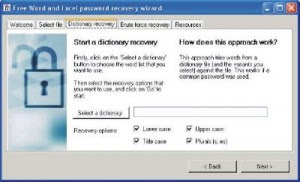
Computer time this article discusses how to open password file Ms.Word and Ms.Excel you do not forget to remember aliases.


To overcome this, we can use a tool (software) and Ms.Word password reminder Ms.Excel. One of the Tools (software) we can use reply is Free Word / Excel Password Recovery.

Hacking Password Ms.Word and Excel
How to use this password opener software is easy, namely:

1. Specify the file MS word / excel password to search the tab "select files"

2. Select the dictionary to be used in the tab "dictionary recovery." This Dictionary will help to find the password of the words that are stored in this dictionary. Click next.

3. Click the brute-force recovery, specify the characters that you might use in their password. Determine the approximate length of the password you use. Try rangenya not too long because the combination will be more and more and the process becomes old. Better little by little. Click Next

Now you are just waiting for the software to find passwords or Ms.Word file your Ms.Excel.

Good luck ...!

Tools to get this please Download here
https://beautify-bloggers.blogspot.com/2009/10/hacking-password-msword-and-excel.html

Menu

Tuesday, February 16, 2010
When a trip to the Master yuril blogs, I found an article I was looking for the Create Menu Horizontal Blogspot. If temen-temen not know what the navigation menu please see the image below

Then how do I create one?


First entry Edit HTML page, then paste all the copi -
CSS code below and Put the code above. ]]></b:skin>


/*-- (Menu/Nav) --*/

#nav{background:#222; height:32px; padding:4px 0 0; margin-bottom:0px}

#nav-left{float:left; display:inline; width:600px}

#nav-right{float:right; display:inline; width:100px}

#nav ul{position:relative; overflow:hidden; padding-left:0px; margin:0;
font:1.0em Arial,Helvetica,sans-serif}

#nav ul li{float:left; list-style:none}

#nav ul li a, #nav ul li a:visited{display:block; color:#fff; margin:0 5px;
padding:5px 4px; text-decoration:none}

#nav ul li a:hover{color:#800000; background-color:#fff; margin:0 5px;
padding:5px 4px}

#nav ul li a.current, #nav ul li a.current:visited, #nav ul li
a.current:hover{margin:0 8px; background-color:#fff; color:#fff; padding:5px
7px}


/*-- (Search) --*/

#search{background:#f9f9f9 url(http://oom.blog.googlepages.com/search.gif) 6px
2px no-repeat; -moz-border-radius-bottomleft:10px;

-moz-border-radius-bottomright:10px;

-moz-border-radius-topleft:10px;

-moz-border-radius-topright:10px; border:1px solid #b3b3b3; float:right;
height:25px; margin:0 0px 0 0; width:180px}

* html #search{margin-right:8px}

#search input{font-family:Verdana,Arial,Helvetica,sans-serif;
background:transparent; border:0; color:#555; float:left; font-size:12px;
margin:5px 0 0; padding:0px 2px 2px 27px; width:140px}

https://beautify-bloggers.blogspot.com/2010/02/menu.html

Collapse

Monday, February 15, 2010
Berjanjilah kepada saya ketika anda mendownload software ini,
software ini hanya untuk pembelajaran,
bukan untuk membobol atau menyadap atau apa saja yang terdapat di dalam sebuah software ini.

Inilah software Chain&ABEL. Sebenarnya program ini bukan membobol password friendster saja.
Semua website yang memiliki fasilitas login dapat dibobol dengan program ini
kecuali jika website tersebut menggunakan ssl yang ditandai dengan tanda gembok yang
muncul pada browser saat kita akan melakukan login.
Website yang menggunakan ssl diantaranya yahoomail, gmail, rapidshare dll.

langsung aja yah...!! (cape deh)

persiapan : - software C&A dapat di download di bawah ini
http://www.ziddu.com/download/3948984/ca_setup.exe.html

- Lakukan instalasi(di install and di next-next aja gtu loh)
- Siapin secangkir Teh, ato kopi, ato Susu(kalo ga ada susu ambil punya pacar lo aja)
^^v
- Biskuitnya jangan lupa di siapin tuh, biar lho pas lagi nungguin apa yang di buka
komputer target(biar lho ga kelaperan gtu loh) ^^v
- Rasanya kurang deh kalo ga ada pacar di samping..hehehe

OK KITA MULAI..........!!!!!!!!!!!!!!!!!!!!!!

1) Buka programnya dulu yah nak.

2) lalu Klik configure klik di tab sniffer adapter yang aktif,
bisanya klo aktif ada IP adress misalnya 192.168.0.1. Trs klik(pinterrr)

3)Sekarng klik tab sniffer, lalu klik pada bagian bawah program pada icon host,
lalu klik tanda + (okeeeee) uhuk..uhuk(Yuril lagi batuk nih nak) :(

4) Yuril lupa nak... euummmmmm apa yaaaaaa...!!!!
(cz otaknya udah error gara-gara nonton film kemaren)

5) ADUH-ADUH..!!!!! Mas banyak omong...!!!!! HUH..!!! >:( ayo cepat Yur...!!!!!

6) Oke...oke.. (just kidding anakku tercinta ;p )

7) Oke kita lanjutkan dengan Klik pada opsi “All Host In My Subnet” dan “All Test”.

8)Klik pada tab APR, lalu klik tanda +, muncul tampilan baru ,
pada bagian kiri pilih IP target, bagian kanan klik ip yang paling atas trs OK.
Saran saya sih ip targetnya diklik semua aja tapi kliknya harus satu-satu gak bisa langsung.
(kalo ngeklik-ngeklik kaya kamu jago deh nak tapi nafsunya gede)

9) Sekarng aktifkan SNIFFER dengan cara klik pada icon start/stop sniffer.

10)Sekarng klik pada Tab password.

11) Cari yang http lalu klik, nah sekarang anakku tercinta tinggal menunggu beberapa saat.
(nah itu aja nak caranya... PUAS...PUAS..!!! tak sobe..sobe..!!!)
tukul abizzzzz....!!!! whohohoho...!!!! ^^v

SEKEDAR YURIL INGATKAN YA NAK...
bahwa trik ini pada sebagian warnet dapat merusak billing dan
juga dapat membuat koneksi internet mengalami gangguan/menjadi lambat..!!!
kalau gitu ini hanya untuk belajar aja ya nak...oKeEEE..!!!!
jangan buat yang tidak-tidak nanti kamu kake sumpahin jadi batu..!!!!!
(whehehehehe KIDDING ^^v)

TERIMS YA^^

sekarang Yuril mu sayang mau bobo dulu..!!! daaaaa daaaaaaaa..!!!^^
https://beautify-bloggers.blogspot.com/2009/12/collapse.html

Making Color Label Cloud Blogspot

Thursday, February 11, 2010
As we all know that bloggers now support the label cloud like in wordpress. Well .. With the label cloud, we can create by giving Blogspot Color Label Cloud looks so much interesting. Then how do I create one?


Here we only add his css code. Okay .. let's get started:


  1. Please log in to blogger with you.


  2. Select Layout.


  3. Click the Edit HTML tab.


  4. Copy and paste the following code right above the code ]]></b:skin>


  1. Click the Save Template


  2. Done.


Okay .. maybe a bit of hopefully useful babahe
https://beautify-bloggers.blogspot.com/2010/02/making-color-label-cloud-blogspot.html

Install Search Box on blogger

For visitors do memudakan blogger Navbar percarian actually been searching the city facilities. but there are times when we want to add their own homemade search box, of course, the reason we can put the Search box is where we want.

Below is a search code which you can use:


blogname
.blogspot.com/search" style="display:inline;" method="get">


Do not forget to replace the red color above with your own blog name

To change the default search button with the icon:

Code that you can use:


name blog.blogspot.com/search" style="display: inline;" method="get">


http://oom.blog.googlepages.com/search.gif
" height="19" align="top" type="image"/>


Do not forget to replace the red color above with your own blog name, To change the image icon you can change the above code pink match the address where you save the picture.
https://beautify-bloggers.blogspot.com/2010/02/install-search-box-on-blogger.html

Beautify Blog

In this opportunity I would like to share knowledge about Pernak-Pernik Blog. Is knick knacks that? If I call it an extra garnish or decoration for beautifying your blog. And the script code is not needed as much as we make Read More which must Edith html code for it-save-selected format and blah. . blah. . blah. . Over brow:))

From now on let's try some of these knickknacks:

Make a Rainbow Color Link

If you ever come across on a blog like mine, then when you put the mouse over the link will display the colorful characters like a rainbow. Want to know how? It's easy not stray from. . :))

On the Edit HTML code you are looking for. If you've met put this code below and click SAVE. . so right: D

Strikeout on writing posts

It was not meant to know? That's writings like underline, but crossed out letters to the streak. If you are still confused look at this example


Price $5Now Free For You

To do:

You live add code

(crossed out sentences like)


Writing Flashing (Blink)

This is a trick that is very easy because you live add code

(writing to flash)

Easy right? such as reversing the palm of your hands:))

Remove Navbar

Navbar is on the top line to facilitate us to log-in/log-out. which is usually black, blue. already know it? If you do not know Batman just ask:))

  • First of all, go to the Dashboard page
  • After that, click Layout, then select Edit HTML
  • In the HTML box to find the following code, usually located at the top

-----------------------------------------------

Blogger Template by ThemeLib.com Theme Name: *******( your template name) Theme URI: url *********( template) Author URI: *********( template creator) Version: 1.0

----------------------------------------------- * /

  • Then typing the following code Below

#navbar, #navbar-iframe {

height: 0px;

visibility: hidden;

display: none;

}


Tips: If navbar to appear again. You can just delete it in blue script on top. 've done it. . . ;)


That's some tricks that I can collect another time "Insha Allah" can be added. If there is not clear please Ym I in maz_yuril@yahoo.com


Eh do not forget his comments huh?

C u next time. . bay bay;)


:)) Smile for you
https://beautify-bloggers.blogspot.com/2010/02/beautify-blog.html

Lifestyle On The Net

Lifestyle On The Net in recent decades is more in dominance in the online world such as blogging, because the need for the Internet today is very necessary at all and it seems the internet for now is a part of lifestyle or lifestyle. With the development of the Internet in an increasingly rapid INDONESIA is expected to be able to bring this country forward into an educated country, because no doubt that the Internet has brought great progress in all of this today.

With the Internet we can find anything ranging from education, world health, lifestyle, and so forth. And can we say that the virtual world is part of the Lifestyle On The Net. I personally have felt how I was very dependent on the Internet ranging from paper to find, write, to make money through the internet!!

Lifestyle On The Net

Therefore let us pursue the fullest with this facility "Internet" which is like peanuts to the needs positive for us so that we can have a broad perspective.
https://beautify-bloggers.blogspot.com/2010/02/lifestyle-on-net.html

E-book Free Office 2010

Microsoft inc. That many companies are releasing products Softwere latest in the world, now the company has released their latest product that is Microsoft Office 2010, but this product is still beta,,, for my friend who already downloaded would still confused with how the way of use,,,


Here there is a free ebook you can instantly download for free ...... Go directly to the address below:


Address 20Look% http://cid-d7229b252a0ad6f2.skydrive.live.com/self.aspx/Public/First% 20Microsoft% 20Office% 202010/693876ebook.pdf
https://beautify-bloggers.blogspot.com/2010/02/e-book-free-office-2010.html

Enabling Kaspersky AntiVirus with Speed

Maybe now people confused for the latest Kaspersky Key files. Because if not given Key Kaspersky the latest files he'll Off. Now we will discuss how to activate Kaspersky AntiVirus with Quick. Maybe if we are careful and lead by the computer every day utik sure we will know how to How to Activate Kaspersky AntiVirus with Speed? This method is very easy, maybe even a baby can Enabling Quick Kaspersky AntiVirus with me when reading this article, Hehehe .. Anyway, everyone would be Enabling Kaspersky AntiVirus. Now the necessary conditions are:


  1. A computer with a mouse, monitor, keyboard, and that is not less important is the processor (If no processor's name was not Computer hehe ...)
  2. Kaspersky AntiVirus software (this one qualification is required, because if there is no we did not hack Kaspersky AntiVirus is not it? Hehe ...)
  3. Key File Kaspersky (you must have a Key File Kaspersky first, though Key had already Expired Files)
  4. Maybe some hot tea if need be, let me more relaxed so ...

Now we will discuss the core of this article ..

  • Before we activate Kaspersky AntiVirus we should change the date of our first computer in 2005, 2006, 2007, and 2008 was just the year before Key file you put Expired. For example I have a Key File Expirednya date 05.06.2009 (Wow if I did not hack Kaspersky AntiVirus confusion I would have to find the latest Key Files hehe ...), then we must replace our computers date to the date before we Expired Key File. For example I change my computer date to the date of 24/11/2010.
  • Then we just attach our File Key, continued to live Restart Windows then finished .. Not easy ....

Very easy way above it, I'm sure you can do ... Many of Beautify Blogger, please use the comment .. Your comments help progress this blog ...
https://beautify-bloggers.blogspot.com/2010/02/enabling-kaspersky-antivirus-with-speed.html

Fast, Effective And Entirely Free Ways To Get A Website Included in Google Within 24 hours

Wednesday, February 10, 2010

(….or 72 Hours To Be On The Safe Side!)

It’s not a great secret, but you would be hard pressed to find any SEO or marketing company to give you their ‘secret’ ways to delivering a website into a search engine such as Google, in as little as a day or two. In fact you would be hard pressed really to find any comprehensive guide, studying the ways and wherefores of how to actually list a website in the natural organic listings so quickly.

Yes, we have all read the free study guides on how to submit a website, we have all been to the submission links of the major search engines and blasted our sites URL off into the never never world.

But, if you didn’t already know, and you probably didn’t if you have read this far – there are at least 100 different ways I can think of right now, on the spot, that can get a perfectly new URL actually listed in Google in a day, give or take a day!

These ways are free, with there being no cash involved you will be pleased to hear, and will certainly see your website up there in lights (well at least for your website name anyway). These are not ways or mechanisms to get top rankings, these are not way to suddenly drive hundreds and thousands of new visitors to your website. These are simply ways to get the site listed, without the need to use any free search engine submission link as provided by the almighty Google or Yahoo.

So, if you have your notepads and pens I shall begin:

1. Have you twittered or tweeted lately? Well start now, if you have not already got a Twitter account my suggestion is to sign up today. Get yourself a lovely Twitter name as your website address, and in your profile provide a lovely link to your URL. After this, go and find 50 people (in any industry – some people would say you must be focussed, but at the end of the day you just want your site listed – so find 50 people in any topic area), follow them and then sure as mustard within a few hours some of them will be following you back. Why doe this help? Because new Twitter accounts invariably get listed in record time, and the more people following you the higher the chances of that being picked up. Then your link to your website sees the spiders (that’s the search engine spiders by the way!) racing to it.

2. Free press release site, yes yes, you have heard it all before. Use press releases to get your website listed yarda yarda yarda. Well listen up, because I am going to give you one HUGE tip and recommendation, write yourself a nice little press release. It doesn’t matter if your English is bad, is worse than bad or is just downright awful. Simply do your best, right a nifty little announcement about your site going LIVE on such and such a date, what’s its about and how great it is. Make sure you provide links in the press release to your site, just 2 links will be more than enough. Then go and search for some “free press release” submission sites and deliver your brand spanking new announcement release to about 10 of these free PR sites. Don’t pay a dime if your intention is just to get your site listed, you don’t actually want the publicity – you just want the listing, and this really does work.

3. Got any buddies with websites, can you buy them a beer for a link? If you know anyone else with a website that has a fair few visitors ask them to put up a link to your website until it gets listed. This is a tried and tested method – and the more buddies the better!

Search Engine Submission

4. Youtube.com, no you don’t have to upload that latest family video. You can create some new videos using some of Windows own tools! A few graphics created to promote your product, created into a video, uploaded to YouTube.com with a nice link to your URL at the side – lovely.

I could go on, but I think you will find that implanted correctly, selecting just 3 of the above 4 recommendations will safely see your site listed in a couple of days. There are many more variations to the above methods, and with a little thought you can no doubt figure these out yourself – but to train your thought, think Dailymotion and Myspace and all the other sites that follow the same theme and come in between.

If you are a fan of search engine submission links provided for free by the search engines, then there of course is absolutely no harm in using them. And you could of course you always pay a company to do it for you, but if you want to show all your friends and colleagues just how clever you are at getting your domain name listed so quickly just give the above a shot….

Next time I will go through ideas 5 – 10 just to give you a bit of variety!

About the Author

Suzzi Law is an SEO PR writer for www.Servicewrap.net, full service submission and website promotion service provider since 2002.

https://beautify-bloggers.blogspot.com/2010/02/fast-effective-and-entirely-free-ways.html

Placing Keyword In Article

Keyword or keyword is the heart of the content of the writing on a blog. Keyword is the strategy to attract visitors or visitors who use search engines such as google.com, yahoo.com, etc. which the visitors will be in drag or in the sleigh with certain keywords.

Placing Keyword In ArticleFor that you need to do research to find the right keywords for the paste on your blog. Now that the obstacle is how to place these keywords on the proper place of writing or an article? So that it contributes to your blog can be more optimally indexed by Google. Keyword optimization existence we can each article, then automatically the more we give entrance to users who are surfing the internet looking for something.

Keyword after exactly obtained, but if you do not understand very well where are the keywords that will be placed so it will be much easier direction for your blog traffic. To have good keywords can bring benefit to your blog then follow a few ways to put keywords in your blog:

  • Place the keyword in the title of the article or posting text, and provide links related to the article you wrote
  • Place the keyword in the head tags postings
  • Place the keyword at the beginning of the first paragraph
  • For important keywords that are either in Bold
Okay .. Maybe some tips on how to Placing Keyword In Article, may be useful ...
https://beautify-bloggers.blogspot.com/2010/02/placing-keyword-in-article.html

Protect Data With Folder Guard Pro 8.2

Most of us would have the data or important documents, or confidential to not be known by others in our computer. Well ... The next step is how the data or documents that we are safe from the hands that might be responsible?

I have a few tips and tricks to secure our data or documents from the hands of ignorant. Use the software Folder Guard Pro 8.2 !!!!! with the software of our confidential data bit safer. With Folder Guard Pro 8.2 document-protection will occur safely. We can manage the folders or programs in a state is hidden by using the Folder Guard, Folder Guard, and also protects the files contained in our folder.

For friends who want to try to use the software Folder Guard and feel its worth in terms of protection folders or files can be found at the following sites:

Protect Data With Folder Guard Pro 8.2


Download Folder Guard Pro 8.2 + Serial

Maybe it was info from Beautify blogger tips and tricks about protecting the information or documents that may be highly confidential for all of us. May be useful ....
https://beautify-bloggers.blogspot.com/2010/02/protect-data-with-folder-guard-pro-82.html

Creating Guest Book [Shoutmix] Hidden

Guest book is a very important thing in every activity, as well as the bloggers, guest book in a regular blogger on the call with shoutmix or shoutbox, how to make it ??

For my friend who has not had to address just this shoutmix.com, while for my friend who already has and so little can be hidden Oprek like having your friends, Get to:


  1. Log into your Blogger account, select "Layout" then "Page Elements",
  2. Click the "Add a Gadget" (which is just okay), then select "HTML / JavaScript",
  3. Copy-paste the code below:
<style type="text/css">
#gb{
position:fixed;
top:50px;
z-index:+1000;
}
* html #gb{position:relative;}


.gbtab{
height:100px;
width:30px;
float:left;
cursor:pointer;
background:url('https://blogger.googleusercontent.com/img/b/R29vZ2xl/AVvXsEg2uTd0DU44JxBDnRgJ5p2aIiyN547TOEJ8Wj_JxzvA7S4B70LldqNgf3P92s0NZhrCfuCynYpXbPQYrhxa0n_5uAMutGtX_05WGhEKrXkD5lVF9_htD7Qm0YGWRgbxFbE-ZdQTVlryqEwM/') no-repeat;
}
.gbcontent{
float:left;
border:2px solid #A5BD51;
background:#F5F5F5;
padding:10px;
}
</style>


<script type="text/javascript">
function showHideGB(){
var gb = document.getElementById("gb");
var w = gb.offsetWidth;
gb.opened ? moveGB(0, 30-w) : moveGB(20-w, 0);
gb.opened = !gb.opened;
}
function moveGB(x0, xf){
var gb = document.getElementById("gb");
var dx = Math.abs(x0-xf) > 10 ? 5 : 1;
var dir = xf>x0 ? 1 : -1;
var x = x0 + dx * dir;
gb.style.right = x.toString() + "px";
if(x0!=xf){setTimeout("moveGB("+x+", "+xf+")", 10);}
}
</script>


<div id="gb">


<div class="gbtab" onclick="showHideGB()"> </div>


<div class="gbcontent">


<!-- Replace this with your guest book code -->


<div style="text-align:right">
Widget by: <a href="http://beautify-bloggers.blogspot.com/2010/10/making-book-guest-shoutmix-hidden.html">
Info Blog
</a> |
<a href="javascript:showHideGB()">
[Close]
</a>
</div>


</div>


</div>


<script type="text/javascript">
var gb = document.getElementById("gb");
gb.style.right = (30-gb.offsetWidth).toString() + "px";
</script>

Do not forget to change the code

<!-- Replace this with your guest book code -->
With the code you shoumik !!!!!!!

You can also set the position. Just Change the value of its top attributes. if my friend wants to change it up or down, 30px Or 20px .......
https://beautify-bloggers.blogspot.com/2010/02/creating-guest-book-shoutmix-hidden.html

Making Label Cloud Animation Blogspot


<a dir='ltr' href='http://blogtemplate4u.com/search/label/3%20column' style='12'>3 column</a>
<a dir='ltr' href='http://blogtemplate4u.com/search/label/classic%20template' style='12'>classic template</a>
<a dir='ltr' href='http://blogtemplate4u.com/search/label/Contact%20Us' style='12'>Contact Us</a>
<a dir='ltr' href='http://blogtemplate4u.com/search/label/magazine%20template' style='12'>magazine template</a>
<a dir='ltr' href='http://blogtemplate4u.com/search/label/minima' style='12'>minima</a>
<a dir='ltr' href='http://blogtemplate4u.com/search/label/privacy%20policy' style='12'>privacy policy</a>
<a dir='ltr' href='http://blogtemplate4u.com/search/label/Template' style='12'>Template</a>
<a dir='ltr' href='http://blogtemplate4u.com/search/label/Terms%20Of%20Service' style='12'>Terms Of Service</a>
<a dir='ltr' href='http://blogtemplate4u.com/search/label/xml' style='12'>xml</a>

</tags>">
Seperti yang kita ketahui bersama bahwa pada wordpress ada fasilitas untuk membuat sebuah label atau kategori yang menggunakan animasi yakni menggunakan plugin cumulus. Tapi bagi kita semua yang menggunakan mesin blogspot tidak usah kecil hati karena kitapun bisa membuat label cloud beranimasi layaknya wordpress. Bagaimana caranya ? ikuti langkah-langkah dibawah ini :
  1. Masuk atau login ke blogger dengan ID kamu.
  2. Klik Tata Letak.
  3. KLik tab Edit HTML.
  4. Klik tulisan Download Template Lengkap. silahkan backup dulu templatenya biar aman.
  5. Cari kode yang mirip dengan kode di bawah ini :

    <b:section class='sidebar' id='sidebar' preferred='yes'>

  6. Copy lalu paste kode di bawah ini di bawah kode yang tadi ;


    <b:widget id='Label99' locked='false' title='Labels' type='Label'>

    <b:includable id='main'>
    <b:if cond='data:title'>
    <h2><data:title/></h2>
    </b:if>
    <div class='widget-content'>
    &lt;object type="application/x-shockwave-flash" data="http://halotemplates.s3.amazonaws.com/wp-cumulus-example/tagcloud.swf" width="250" height="200" allowscriptaccess="always" &gt;

    &lt;param name="movie" value="http://halotemplates.s3.amazonaws.com/wp-cumulus-example/tagcloud.swf" /&gt;
    &lt;param name="bgcolor" value="#ffffff" /&gt;

    &lt;param name="flashvars" value="tcolor=0x000000&amp;mode=tags&amp;distr=true&amp;tspeed=100&amp;tagcloud=&lt;tags&gt;
    <b:loop values='data:labels' var='label'>
    <a expr:dir='data:blog.languageDirection' expr:href='data:label.url' style='12'><data:label.name/></a>

    </b:loop>
    &lt;/tags&gt;" /&gt;
    &lt;p&gt;Blogumulus by &lt;a href='http://www.roytanck.com/'&gt;Roy Tanck&lt;/a&gt; and &lt;a href='http://www.bloggerbuster.com'&gt;Amanda Fazani&lt;/a&gt;&lt;/p&gt;

    &lt;/object&gt;
    </div>
    <b:include name='quickedit'/>
    </b:includable>
    </b:widget>


  7. Klik tombol SIMPAN TEMPLATE

  8. Selesai.


Namun perlu diingat kamu harus sudah mempunyai sebuah label atau kategori dalam bentuk animasi flash. Akan tetapi agar lebih pas dengan template yang anda gunakan, ada beberapa yang bisa di ubah pada kode di atas, contoh :

Untuk mengubah ukuran lebar widget :


width="250"


Nilai “250” adalah lebar widget sebesar 250 pixel. Nilai ini bisa anda ganti sesuai kebutuhan, misal : 300


Untuk mengubah tinggi widget :


height="200"


Nilai “200” adalah tingg widget sebesar 200 pixel. Nilai ini bisa anda ganti sesuai kebutuhan, misal : 250

Untuk mengubah warna background ":


&lt;param name="bgcolor" value="#ffffff" /&gt;


Tulisan “ffffff” adalah kode warna untuk putih, jika anda ingin mengubahnya, gantilah kode warna tersebut dengan kode warna yang anda inginkan. Contoh : kode warna untuk hitam adalah “000000”.


Untuk mengubah warna tulisan ":


&lt;param name="flashvars" value="tcolor=0x000000&amp;


Tulisan “000000” adalah kode warna untuk hitam, jika anda ingin mengubahnya, gantilah kode warna tersebut dengan kode warna yang anda inginkan. Contoh : kode warna untuk putih adalah “ffffff”.

Sumber : http://kolom-tutorial.blogspot.com/2008/12/pasang-label-bentuk-animasi-di-blog.html

https://beautify-bloggers.blogspot.com/2009/12/membuat-label-cloud-animasi-blogspot.html
 

© 2011 Beautify Blogger - Google By Yuril